Difference between revisions of "First simulation by Jozsef Nagy"
Jump to navigation
Jump to search
Jozsef Nagy (talk | contribs) (Created page with "* '''author''': Jozsef Nagy * '''affiliation''': Universita degli Studi di Genova, Wolf Dynamics * '''contact''': [email protected] * '''OpenFOAM version''': 3.0 * '''Pub...") |
Jozsef Nagy (talk | contribs) |
||
| (33 intermediate revisions by 2 users not shown) | |||
| Line 1: | Line 1: | ||
| − | * ''' | + | [[category:basic tutorial]] |
| − | * '''affiliation''': | + | [[category:laminar]] |
| − | * '''contact''': | + | * '''contributor''': Jozsef Nagy |
| − | * '''OpenFOAM | + | * '''affiliation''': eulerian-solutions e.U., Linz, Austria |
| − | * ''' | + | * '''contact''': <mail address='jnmlujnmlu@gmail.com' description='author'>click here for email address</mail> |
| + | * '''OpenFOAM versions''': v2412 | ||
| + | * '''published under''': CC BY-NC-SA license ([https://creativecommons.org/licenses creative commons licenses]) | ||
| − | =First simulation in OpenFOAM= | + | Go back to [https://wiki.openfoam.com/index.php?title=Day_1 Day 1]. |
| + | |||
| + | Go back to [https://wiki.openfoam.com/%22first_glimpse%22_series "first glimpse" series] | ||
| + | |||
| + | =[https://www.youtube.com/watch?v=KznljrgWSvo First simulation in OpenFOAM]= | ||
| + | |||
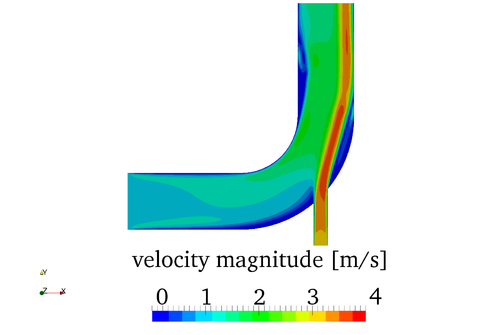
| + | In these videos [[File:Elbow.png|500px|right|velocity magnitude of the elbow case at t=75s]] | ||
| + | |||
| + | * [https://www.youtube.com/watch?v=KznljrgWSvo part 1] | ||
| + | * [https://www.youtube.com/watch?v=bJTSKaxG58Y part 2] | ||
| + | |||
| + | you will learn about | ||
| + | |||
| + | * the basic case setup of OpenFOAM | ||
| + | * the initial values of your simulation | ||
| + | * the mesh (e.g. the boundaries) | ||
| + | * running the simulation of the flow in a 2D elbow case with three different meshes | ||
| + | * post processing | ||
| + | |||
| + | You will familiarize yourself with the terminal in Linux, where you will run all your simulations in OpenFOAM. You will also get a first idea on the work flow that you have to follow in order to run a successful simulation. | ||
| + | |||
| + | You can download the .msh file here: | ||
| + | |||
| + | [https://github.com/jnmlujnmlu/OpenFOAMTeaching/tree/master/JozsefNagy msh-file] | ||
| + | |||
| + | (left click on it, then right click on Raw, then save as) | ||
Latest revision as of 09:05, 31 January 2025
- contributor: Jozsef Nagy
- affiliation: eulerian-solutions e.U., Linz, Austria
- contact: click here for email address
- OpenFOAM versions: v2412
- published under: CC BY-NC-SA license (creative commons licenses)
Go back to Day 1.
Go back to "first glimpse" series
First simulation in OpenFOAM
In these videos

you will learn about
- the basic case setup of OpenFOAM
- the initial values of your simulation
- the mesh (e.g. the boundaries)
- running the simulation of the flow in a 2D elbow case with three different meshes
- post processing
You will familiarize yourself with the terminal in Linux, where you will run all your simulations in OpenFOAM. You will also get a first idea on the work flow that you have to follow in order to run a successful simulation.
You can download the .msh file here:
(left click on it, then right click on Raw, then save as)
